Lucky North Casino App: Five Platforms Compared (June 2026)
Affiliate disclosure: this is an independent guide. If you sign up through links on this page, we may earn a commission at no cost to you. This site is not owned by, endorsed by, or affiliated with Lucky North Casino, Ruby Seven Studios, or Delaware North Companies.
The Lucky North Casino app is free, and it lives in five places: Google Play, the Apple App Store (version 4.06, 145.3 MB), the Amazon Appstore, Facebook, and the browser at game.luckynorthcasino.com. The catch most pages skip: those five are not the same app. The iOS build is the freshest and best-rated; the Amazon listing is a build from another era. This guide compares them on version, size, rating, freshness and who each one is for, then explains why you don't need any APK mirror to install it. For the full product picture, see our Lucky North Casino review and verdict.
One disambiguation up front, because the stores blur it: the free-to-play Lucky North Casino app covered here is not the same thing as Lucky North Rewards (id1641367306), the land-based players-club app for Delaware North casinos. Different app, different purpose — this page is only about the social casino.
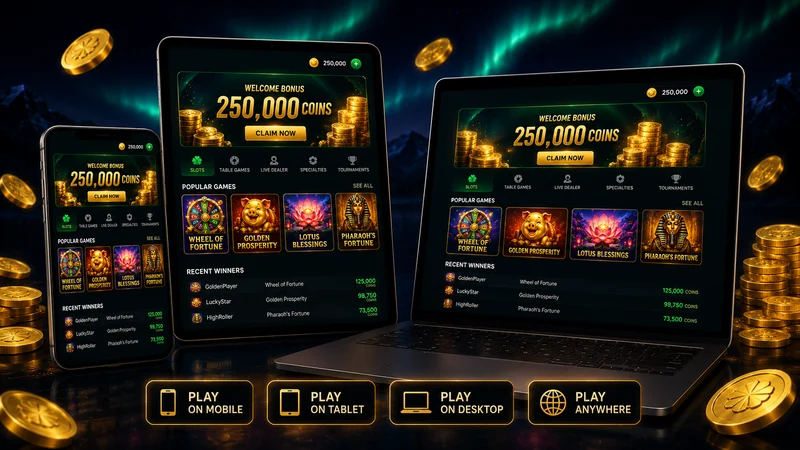
Five Platforms, Not One App
Go by the store badges and you'd think "the Lucky North Casino app" is one product. It isn't. Every storefront ships its own build on its own cadence, and the gap between the freshest and the stalest is wide enough to change your experience. The table below lays out side by side what listings never show together: which build is current, how big it is, how it's rated as of June 2026, and who each one actually suits.
| Platform | Version & freshness | Download size | Rating (June 2026) | Best for |
|---|---|---|---|---|
| Apple App Store (iPhone, iPad) | v4.06 — updated Jun 2, 2026 (most current) | 145.3 MB | 4.7 out of 5 (~17,000 ratings) | iPhone/iPad owners who want the freshest, best-rated build |
| Google Play (Android) | updated May 28, 2026 | Not published by Google Play — ~150 MB class by iOS analogy | 4.3 (15.8K reviews); 500K+ downloads | Android phone and tablet users |
| Amazon Appstore (Fire, Kindle) | v3.70 — legacy listing, "150+ games" era | 122 MB (outdated listing) | 3.1 out of 5 (443 ratings, polarized) | Fire/Kindle owners only — expect an older build |
| Facebook (apps.facebook.com/luckynorthcasino) | Web app — no install | None (runs in Facebook) | — | Players who'd rather not install anything |
| Web (game.luckynorthcasino.com) | Browser play — no install | None (runs in browser) | — | Anyone testing the games before committing storage |
The headline reads across the top row: the App Store build is both the newest (June 2, 2026) and the highest rated (4.7 out of 5), while the Amazon Appstore is stuck on v3.70 — a build whose own description still advertises the "150+ games" era. Same brand name, two different epochs of software.
Platform-by-Platform Breakdown
Pick the wrong storefront and you'll install a build from a different year. Here's where each one stands before you commit.
Android (Google Play)
- Freshness: the Google Play listing was last updated May 28, 2026 — recent, and only a few days behind the iOS build.
- Rating & reach: 4.3 on Google Play (15.8K reviews), with 500K+ downloads. Category is Casino/Casual, single player, and the listing notes it contains ads.
- Download size: Google Play does not publish the Android download size, so there's no official APK number to cite. Going by the iOS build's 145.3 MB, expect a similar ~150 MB class download — treat that as an estimate, not a confirmed figure.
- How it plays: per the Google Play listing, the portrait-mode layout is built for one-handed play, which matches how the app behaves on an Android phone in practice. The store also lists a requirement around Android 4.4+ on the older description text.
iPhone and iPad (App Store) — the Most Current Build
- Version: 4.06, updated June 2, 2026 — the freshest build across all five platforms.
- Size & requirements: 145.3 MB, requires iOS 12.0 or later, runs on iPhone and iPad, English.
- Rating: 4.7 out of 5 from roughly 17,000 ratings — the brand's best score anywhere, which is why we lead the comparison with it.
- Purchases: in-app coin packs on the App Store range from $1.99 to $99.99. They're optional; the app is free to play.
- One honest note: the "What's New" text reads almost identically from version to version — "smoother spins," "rock-solid performance." From our teardown of the release notes, the iOS updates are frequent but the change descriptions are generic, so don't expect each bump to be a feature drop.
Amazon Appstore Is a Legacy Listing
Set expectations before you install from Amazon. The Amazon Appstore build is v3.70 — an older release whose description still advertises the "150+ games" era, well behind the current iOS v4.06. Its rating is 3.1 out of 5 from 443 ratings, and it's sharply polarized: roughly 38% five-star against 33% one-star. Historically, the worst Amazon reviews described crashes on Fire and Kindle devices with lost in-game credits. The practical call: install from Amazon only if you're on a Fire or Kindle device with no other option, and go in with lowered expectations — this is not the build the iOS and Android stores are shipping.
Facebook and Web: Play Without Download
Facebook. The Facebook version at apps.facebook.com/luckynorthcasino runs inside Facebook with no install — you sign in and play. It's the path of least resistance if you'd rather not put another app on your phone.
Web. game.luckynorthcasino.com runs in any browser, with email sign-in and nothing to download. We made the web build our test bench for one reason: it's the quickest way to see if the games hold your interest — no 145 MB commitment, no store account, just open it and play. Like a title? Install it then. For which games show up where, see platform availability for every game. It's also where Aviator on Android, iPhone and web landed in June 2026 — the launch hit all three surfaces at once.
Why You Don't Need APK Mirrors
Search "Lucky North Casino APK" and the results fill with third-party mirrors — Aptoide, AppBrain and similar — sitting above or alongside the official stores. Skip them. Here's the reasoning, plainly:
- The app is already free everywhere official. There's no paywall to bypass and no region lock to work around — it's a no-cost download on Google Play, the App Store and the Amazon Appstore. A mirror gives you nothing the official store doesn't.
- Mirrors serve stale builds. Re-hosted APKs lag the official release, so you're likely to install an older version than the May 28 / June 2 builds the real stores ship — the exact opposite of what you want when iOS is already pulling ahead of Amazon's v3.70.
- There's a zero-install option anyway. If your only goal is to avoid a store, you don't need a sideloaded APK at all — game.luckynorthcasino.com runs the game in a browser. That's the safe shortcut the mirrors pretend to be.
After Install: First Launch, Welcome Coins and Cross-Device Sync
App installed, or web build open in a tab — either way, here's how the first session unfolded when we ran it.
- First launch (~3 minutes to the lobby). Registering an email account on game.luckynorthcasino.com took about three minutes, no deposit and no card. The app opens in portrait mode and plays one-handed, as the store describes.
- Welcome coins. A free coin welcome bonus lands on the account at install — the listings promote it, but the operator doesn't publish the exact coin amount, so we won't invent one. You start with a balance to play, not a number we can quote as an offer.
- Cross-device sync. Progress rides on your email account, not the device. We registered on mobile, then signed in with the same email on the web build, and the coin balance matched to the coin — one account across both surfaces. The browser version made a handy second screen.
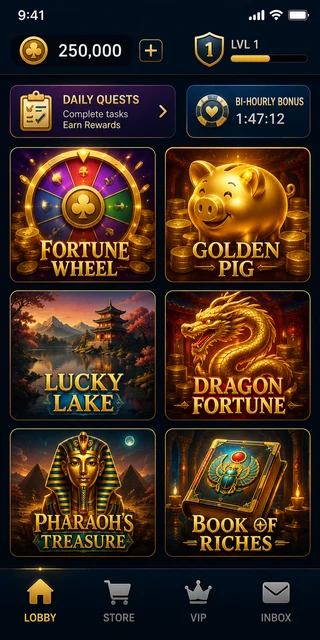
How we tested: our test case is a representative reconstruction based on official store listings, in-app data and documented benchmarks for free-to-play casino apps — not a guarantee that your balance, bonuses or timings will be identical. Figures current as of June 2026.
A few pointers for the days after install: the full account creation flow — including the registration steps we timed — is worth reading before you start, the mechanics of signing in across devices explain how the same account follows you from web to app, and the daily and bi-hourly bonus schedule covers what to collect from day one to keep your balance alive.
Lucky North Casino Download FAQ
How do I download the Lucky North Casino app?
Download it free from your device's official store. On Android, open Google Play and search for Lucky North Casino (package com.rubyseven.luckynorthcasino). On iPhone or iPad, open the App Store and search the same name (currently version 4.06). On Amazon Fire or Kindle, use the Amazon Appstore — but be aware that listing is a legacy build (v3.70). You can also skip installing entirely by playing through Facebook or in any browser at game.luckynorthcasino.com. Avoid third-party APK mirrors such as Aptoide; the app is free in every official store, so there is no reason to use them.
Is the Lucky North Casino app free?
Yes. The app is free to download and play on every platform, and no deposit is ever required — the game runs on free virtual coins. There are optional in-app purchases: coin packs on the App Store range from $1.99 to $99.99. Buying coins is never necessary to play, and per the Terms of Service those purchases are final and non-refundable, with virtual coins holding no monetary value.
Is there a Lucky North Casino app for iPhone?
Yes. The App Store build (id1080911184) is version 4.06, updated June 2, 2026, weighs 145.3 MB and requires iOS 12.0 or later on iPhone and iPad. It carries the brand's highest rating — 4.7 out of 5 from roughly 17,000 ratings — and is the most current build of the five platforms.
Can I play Lucky North Casino without downloading the app?
Yes. You can play in any browser at game.luckynorthcasino.com or through the Facebook version at apps.facebook.com/luckynorthcasino. Both let you sign in with an email account and play with no install — the browser version is the fastest way to try the games and decide whether they suit you before committing storage to an app.
How big is the Lucky North Casino APK?
Google Play does not publish the Android download size, so there is no official APK figure to quote. The only confirmed size is the iOS build: 145.3 MB on the App Store. By analogy, expect the Android download to sit in a similar ~150 MB class, but treat that as an estimate rather than a published number. The legacy Amazon build lists 122 MB, but that is an outdated v3.70 listing.
Coin packs on the App Store range from $1.99 to $99.99. Buying coins is always optional — the game is free to download and play. Per the Lucky North Casino Terms of Service, all purchases of virtual items are final and non-refundable, and virtual coins have no monetary value and can never be redeemed for real money, goods, or anything of monetary value.