Lucky North Casino Login: Which Sign-In Do You Actually Need?
Affiliate disclosure: this is an independent guide. If you sign up through links on this page, we may earn a commission at no cost to you. This site is not owned by, endorsed by, or affiliated with Lucky North Casino, Ruby Seven Studios, or Delaware North Companies.
Two sign-ins wear the same Lucky North name, and Google keeps stitching them into one. The game takes the email you registered with — in the app or at game.luckynorthcasino.com. The players club, Lucky North Rewards, takes a card number and PIN, and it lives on the websites of land-based casinos. Two separate accounts; not one door with two keys. Find your row in the table below and jump to the steps that actually apply to you.
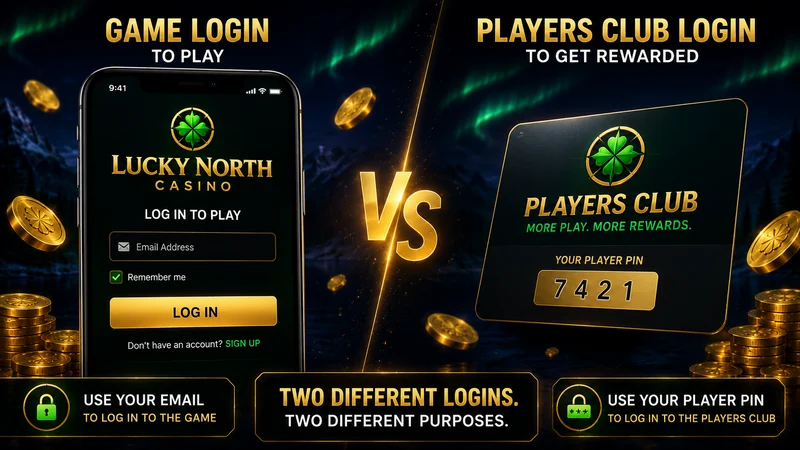
Which Login Do You Need? (30-Second Check)
One name, two products. If you have been typing a card number into a coin game — or an email into a casino kiosk — this is why nothing works. Match your situation to the right column.
| Your situation | Game sign-in (Lucky North Casino) | Lucky North Rewards login (card number and PIN) |
|---|---|---|
| "I play slots on my phone for free coins" | This one. Sign in with your email in the app or at game.luckynorthcasino.com. Virtual coins, no cash value. | Not for you. |
| "I have a players-club card from Southland, Wheeling Island or Mardi Gras" | Not for you. | This one. Sign in with the card number and PIN on the casino's own website — it is not the same as the Lucky North Rewards account link with the coin game. |
Lucky North Casino (the free-to-play app) is not the same as Lucky North Rewards (the land-based players club app). Strip the noise out of the login complaints and most of them are this one confusion wearing different clothes. From here the page walks the game sign-in, then the Rewards account, then the fix for the error that has dominated since the January 2026 redesign.
Sign In to the Game at game.luckynorthcasino.com
The game account is an account login built around the email you used at registration. The web player at game.luckynorthcasino.com is the same account as the app — we signed in on a desktop browser mid-session and the coin balance picked up exactly where the phone left off, no second setup, no re-link. If you do not have an account yet, sign up for a new account first; the steps below assume you already registered.
- Open the sign-in screen. Launch the app, or go to game.luckynorthcasino.com in a browser, and choose Sign In.
- Enter the email you registered with. Type the email address and password you set up at registration. If you signed up through Facebook, use the Facebook button instead — there is no separate password in that case.
- Confirm and load the lobby. Submit, and the lobby opens on the account tied to that email — same balance, same level, same progress.
A note on guest play: you can open the game without an account, but a guest session does not sync progress across devices, and it can be lost. If you want your coins to follow you from phone to web and back, sign in with an email (or Facebook), not as a guest.
App Login on Android and iPhone (Email, Facebook, Guest)
The app gives you three ways in, and the choice matters more than it looks.
- Email. Sign in with the email address you registered with. This is the most portable option — the same credentials work in the app and on the web player.
- Facebook login. One tap and you are in. The trade-off: it ties your game progress to that Facebook account, so if you ever lose access to Facebook you lose the easy route back to that balance.
- Guest. Quick to start, but a guest session does not carry your progress between devices. Treat it as a test drive, not a home.
One practical reason the email matters: after you uninstall and reinstall the app, signing in with the same email returns your balance. We confirmed this the blunt way — wiped the app, put it back, logged in, and the coins were all still there. The account lives on the server, not on the device, so a reinstall never touches your balance as long as you come back with the credentials you registered. That is exactly the move that fixes the cache bug below. Once you are in, you can browse the slot lobby once you're in and pick up where you left off.
Lucky North Rewards Login Is a Different Account
This is the column most search confusion lands in. Lucky North Rewards is the players-club program for Delaware North's land-based casinos — a completely separate account from the coin game, with its own app (App Store id1641367306). You do not sign in with an email here; you use your card number and PIN.
Where the Rewards login lives. You sign in on the website of the casino that issued your card, or in the dedicated Lucky North Rewards app — never at game.luckynorthcasino.com. The card-and-PIN sign-in appears on the players-club pages of the connected properties:
- Southland Casino Hotel — southlandcasino.com (West Memphis, Arkansas)
- Mardi Gras Casino & Resort — mardigrascasinowv.com (Cross Lanes, West Virginia)
- Wheeling Island Hotel-Casino-Racetrack — wheelingisland.com (Wheeling, West Virginia)
As for connecting the two: the operators say a link between your Lucky North Casino and Lucky North Rewards accounts is on the way. That promise still wears a coming soon tag, and it has worn it long enough that we would not plan around a launch date. Today they are two unrelated logins, full stop.
Can't Log In? Fix the January 2026 Cache Bug First
Since the January 2026 redesign, the single most common login failure is not a wrong password — it is a cache bug. The lobby loads a stale balance, or the app stalls on sign-in, after it has been backgrounded. A Google Play player flagged it on February 16, 2026 ("the cache gets fouled up and no response from support"), and support never wrote back. The same glitch caught us on Day 2 — lobby frozen on a balance that was hours stale — and the sequence below is what unstuck it by Day 5.
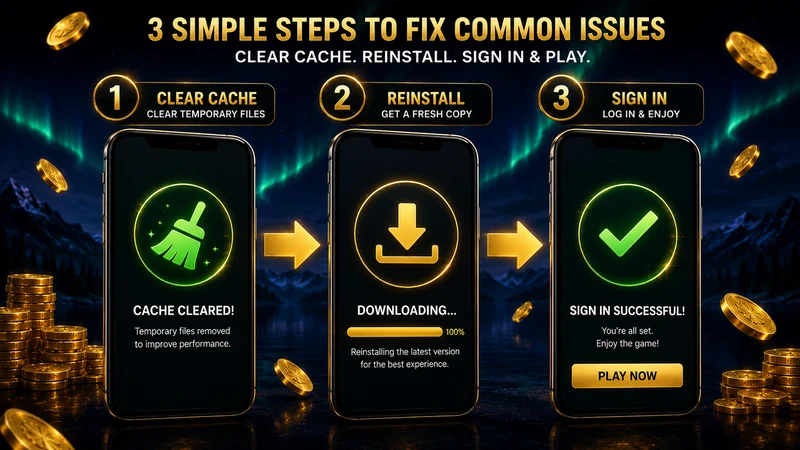
The fix that worked, in order:
- Clear the app cache. On Android: Settings → Apps → Lucky North Casino → Storage → Clear cache (clear cache, not data — clearing data signs you out locally, but your account still lives on the server). On iPhone, offloading or deleting the app does the same job, since iOS has no separate cache button.
- Reinstall the latest build. Delete the app, then install the current version from the store — reinstalling the latest app build from the official store, not an APK mirror, so you are on the redesigned client and not a stale cached one.
- Sign in with the same email. Open the fresh install and log in with the email address you registered with. Your balance and progress return because the account is server-side; the reinstall just throws away the corrupted local cache.
If a clean reinstall still won't let you in, run through the rest of the checklist before assuming the account is the problem:
- Password. Re-enter it carefully, or reset it (see the next section). If you registered through Facebook, use the Facebook button — there is no separate password.
- Network. Switch between Wi-Fi and mobile data; a weak or captive-portal connection can hang the sign-in handshake.
- VPN. Turn off any VPN or region tool. The game is US-facing, and a foreign exit node can break the connection.
- App version. Confirm you are on the newest store build — an old client is exactly what the redesign cache bug feeds on.
How we tested: our test case is a representative reconstruction based on official store listings, in-app data and documented benchmarks for free-to-play casino apps — not a guarantee that your balance, bonuses or timings will be identical. Figures current as of June 2026.
Forgot Password and Account Recovery
If the cache fix did not help and the password is the real issue, recover it through the sign-in screen rather than creating a second account (a duplicate account starts from zero and will not see your existing coins).
- Use Forgot Password. On the game sign-in screen, tap Forgot Password and request a reset email for the address you registered with.
- Check email, including spam. Reset messages can land in spam or promotions. Open the link and set a new password.
- If the reset fails, email support. Contact [email protected] through the in-app Helpshift form — for example if you have lost access to the registered email and the automated reset cannot reach you.
Set your expectations on timing. Plan for up to three days for a reply. Our own ticket sat for roughly 65 hours before a canned reply landed — inside the usual 24-to-72-hour window for social casino support, but scraping the top of it, and the answer ("clear cache and reinstall") had clearly never looked at our account. The brand's in-app help center holds more recovery detail, except it is locked behind the app itself, so we will not paraphrase pages we could not open and verify. If you are not even sure this is the right product — that you are dealing with the coin game and not the players club — start with what Lucky North Casino actually is before you reset anything. And once you are back in, the first thing to do is collect your stacked daily bonuses so the days you were locked out don't go to waste.
Lucky North Casino Login FAQ
How do I log in to Lucky North Casino?
Sign in to the game with the email address you registered with — either in the app or at game.luckynorthcasino.com. Open the app or the web player, choose Sign In, and enter your email and password (or use the Facebook button if you registered that way). Your coin balance and progress follow the account, so the same email shows the same balance on phone and web. There is no card number or PIN involved — that belongs to Lucky North Rewards, a separate land-based players club.
Is Lucky North Casino login the same as Lucky North Rewards login?
No. They are two different accounts that happen to share the Lucky North name. Lucky North Casino is the free-to-play social casino app — you sign in with an email at game.luckynorthcasino.com or in the app, and you play with virtual coins that have no cash value. Lucky North Rewards is the land-based players club for Delaware North casinos — you sign in with a physical card number and PIN on sites like southlandcasino.com, mardigrascasinowv.com or wheelingisland.com, and it tracks real comps. The operators have announced a future link between the two, but it is still marked coming soon.
What if I forgot my Lucky North Casino password?
Use the Forgot Password link on the game sign-in screen and request a reset email for the address you registered with. Check spam if it does not arrive. If the reset flow fails or you have lost access to that email, contact [email protected] through the in-app Helpshift form. Plan for up to three days for a reply — when we tested the support channel, a templated answer came back in roughly 65 hours. If you signed up through Facebook, you do not have a separate password; just use the Facebook button to sign back in.
Can I log in with Facebook?
Yes. The app offers a Facebook sign-in option alongside email. It is fast, but it ties your game progress to that Facebook account — if you later lose access to Facebook, you lose the easy route back to that balance, so it is worth knowing the registered email as a backup. Guest play is also available, but a guest session does not carry your progress across devices; only an email or Facebook account syncs.
Why can't I log in to my Lucky North Casino account?
Since the January 2026 redesign, the most common cause is a cache bug: the lobby loads a stale balance or stalls on sign-in after the app has been backgrounded. The fix that worked in our test is to clear the app cache, reinstall the latest build, then sign in again with the same email. If that does not solve it, check the basics: confirm the password (or use Facebook if you registered that way), test a different network because spotty Wi-Fi can hang the sign-in, and disable any VPN, since region tools can interfere with the connection. Still stuck? Email [email protected] and expect up to three days for a reply.